How to Write Technical Specifications People Actually Read
Tired of writing docs nobody reads? Learn how to write technical specifications that are clear, actionable, and drive results. Real-world tips included.
So, what exactly is a technical specification? At its core, it's the document that lays out a product's requirements, features, and how it’s all supposed to work. Think of it as the blueprint that guides your development team, making sure everyone builds the same thing. It gets the project scope, architecture, functional needs, and success criteria on paper before anyone starts coding.
Why Most Technical Specs Are Glorified Sleep Aids
Let's be brutally honest. Most technical specifications are where great projects go to die. They’re either so painfully vague they’re useless (“The user should have a good experience”) or so dense they make tax code look like a beach read.
You know the ones. They land in your inbox with a thud and are promptly archived, never to be seen again. Is anyone else getting sleepy just thinking about it?

This isn’t just a documentation problem; it’s a project problem. Bad specs are the root cause of those endless clarification meetings, wasted dev cycles, and that sinking feeling when you realize the feature you shipped is not what anyone actually wanted. We’ve all been there. It’s the "but I thought you meant..." of the software world.
Flipping The Script On Specs
But what if we flipped the script? A great technical specification isn't about bureaucracy or checking a box. It's an act of clear communication that empowers your team. It’s the difference between building with a blueprint and building with a blindfold on.
A spec that actually works sets a clear direction, anticipates roadblocks, and gives everyone—from engineers to project managers—the confidence to move forward.
The core elements are simple but powerful:
- A Clear Problem Statement: What specific pain point are we solving for the user?
- Defined Scope: What are we building, and just as importantly, what are we not building?
- Actionable Requirements: How will it work, from user stories to non-functional needs like performance and security?
- Success Metrics: How will we know if we’ve actually won?
This guide will show you how to write technical specifications that don't just sit in a folder. We'll give you a practical framework to create documents that get read, get used, and get results.
A spec is more than a document; it’s a shared understanding. When done right, it prevents confusion, aligns stakeholders, and becomes the single source of truth that keeps a project on the rails.
To really nail this, it helps to see what separates the good from the bad. I've seen both sides of the coin plenty of times, and the difference is stark.
Anatomy Of A Spec That Gets Results
This table isn't just a checklist; it's a mindset shift. Moving from the left column to the right is how you create a document that fuels progress instead of confusion.
Why This Matters More Than Ever
Organizations are catching on to the high cost of miscommunication. The market for technical writing tools is projected to double, expanding from $2.55 billion to $5.0 billion by 2035. This isn't just about buying more software; it shows a massive shift toward recognizing that precise documentation is essential for efficiency and success. You can and see how the market is evolving.
This is where modern tools for collaboration and documentation, like the integrated workspace in , become incredibly valuable. They help teams capture, refine, and share knowledge without the chaos of scattered docs and endless email chains.
The Prep Work That Prevents Project Chaos
Jumping straight into writing a technical spec is a classic rookie mistake. It’s like trying to build a house without a blueprint—sure, you’re busy, but you’re really just setting yourself up for a chaotic collapse down the road.
The real magic, the work that saves you from endless headaches later, happens before you type a single word of the actual spec. This whole prep phase boils down to asking the right questions.
First, Define the Problem, Not the Solution
It’s easy to get excited about a new feature or a cool technical solution. But before you even think about databases or API endpoints, you need to fall in love with the problem you're solving. Get obsessed with it.
Talk to users. Dig through support tickets. What's the real friction they're feeling? If you can't state the core user pain point in a single, clear sentence, your spec is going to be built on shaky ground.
- A bad problem definition sounds like: "We need a new dashboard."
- A good problem definition sounds like: "Sales managers can't see their team's real-time performance, forcing them to spend hours manually exporting reports. This delays critical coaching opportunities."
See the difference? The second one gives you a powerful "why." It frames the entire project around a tangible business need. Every single decision you make from here on out can be measured against that one statement. This kind of focus is a cornerstone of solid development, a concept you'll find in many .
Know Your Audience Like the Back of Your Hand
Once the problem is crystal clear, you have to know who you’re writing for. A technical spec isn't a one-size-fits-all document. The language, tone, and level of detail have to be just right for its readers.
Are you writing for a senior backend engineer who thinks in system architecture and data schemas? Or is it for a junior frontend developer who needs pixel-perfect mockups and detailed notes on user interactions? Maybe it's for a third-party contractor who needs every single assumption spelled out, leaving no room for interpretation.
A spec written for everyone is a spec written for no one. Tailoring it to your audience is the difference between a document that gets used and one that gets ignored.
A spec for a backend engineer might be all about database migrations and API contracts. For a frontend team, it’s going to be packed with user flow diagrams, component states, and accessibility requirements. If you misjudge your audience, you’ll either drown them in irrelevant details or leave them with huge, unanswered questions.
Drawing Firm Boundaries to Stop Scope Creep
Finally, let’s talk about that project-derailing monster we all know and love: scope creep. This is where those small, "quick" additions slowly inflate a project until it’s late, over budget, and barely recognizable. Your prep work is your first and best line of defense.
This is where you have to be ruthless. Explicitly state what is in scope and, just as importantly, what is out of scope.
Every new feature idea that pops up needs to be held up against your core problem statement. Does it directly help solve that specific user pain? If the answer is no, it goes on the "out of scope" or "future considerations" list. No exceptions.
Learning is non-negotiable for keeping projects on the rails, and a well-defined spec is your primary tool for doing it.
This is exactly where a tool like Zemith can be a lifesaver. You can use its Workspaces to create a single source of truth for your project's scope. This gets everyone—from product to engineering—on the same page from day one, stopping those costly misunderstandings before they even have a chance to start.
Putting Pen to Paper: How to Structure Your Spec
Okay, the groundwork is laid. You’ve nailed down the why, the who, and the what's-not-included. Now comes the fun part: drafting the actual blueprint that turns your idea into something engineers can sink their teeth into.
Let's be real—nobody wants to read a 50-page epic. A great spec is all about clarity, structure, and getting straight to the point. We're going to break down the essential pieces that will make your development team thank you.
This whole process really starts before you write a single requirement. It’s about getting your ducks in a row first.
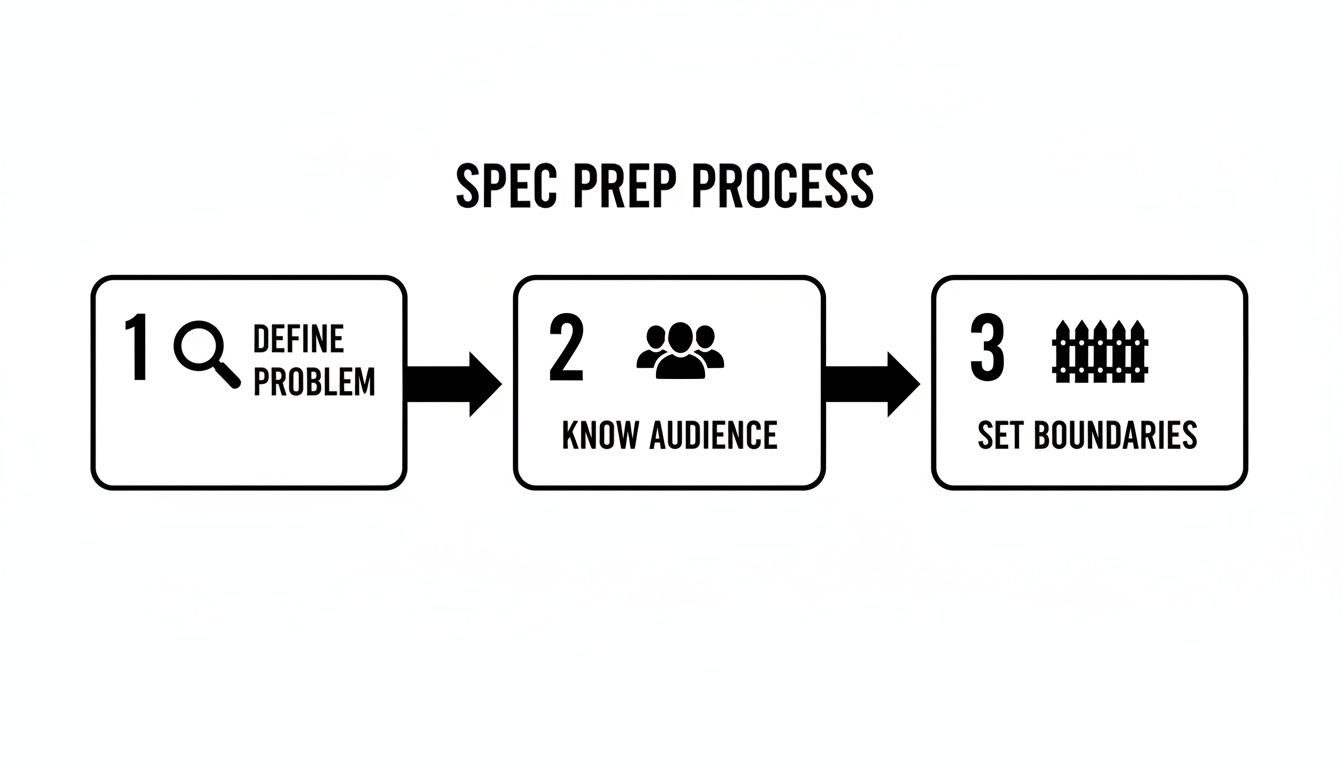
As you can see, a successful spec is built on a solid foundation of understanding the problem, the audience, and your project's boundaries.
Functional Requirements: What Will This Thing Actually Do?
This is the heart and soul of your spec. Functional requirements spell out the system's specific behaviors—what it needs to do. The biggest trap here is just listing out features. Please don't do that.
Instead, think in terms of user stories. It’s a simple shift, but it keeps the focus squarely on the user’s needs and provides instant context for everyone involved.
The classic user story format is pure gold:As a [type of user], I want [an action] so that [a benefit].
Let's apply this to a new "file upload" feature.
- The Vague Way: "Users can upload files." (This just leads to a dozen questions.)
- The User Story Way: "As a registered user, I want to upload a PDF document up to 10MB so that I can share it with my team."
Boom. Instantly, we have clarity. We know the user, the action, the file type, a size constraint, and the motivation behind it all. An engineer can take that and run with it. You should also think through the user flows and tricky edge cases. What happens if the upload fails? If the user isn't logged in? Answering these questions now will save you weeks of bug-fixing down the road.
Non-Functional Requirements: The Unsung Heroes
If functional requirements are the "what," non-functional requirements (NFRs) are the "how well." These are the behind-the-scenes qualities that make a feature feel snappy and robust instead of clunky and frustrating. Skipping NFRs is like building a Ferrari with a lawnmower engine—it might look the part, but it won't perform.
Non-functional requirements are where good projects become great. They define the experience, ensuring the feature isn't just functional, but also fast, secure, and reliable.
Here are the NFRs you absolutely cannot afford to ignore:
- Performance: "Make it fast" is useless. Get specific. "The user dashboard must load in under 2 seconds for users with up to 500 records."
- Scalability: Can this feature handle success? "The system must support 1,000 concurrent file uploads during peak hours without a drop in performance."
- Security: This one is non-negotiable. "All uploaded files must be scanned for malware, and access must be restricted to authenticated users from the same organization."
- Reliability: What's your uptime goal? "The file upload service must maintain 99.9% uptime."
Defining these upfront prevents painful, expensive architectural changes later. If you want to dive deeper, is a fantastic resource for thinking through these big-picture decisions.
System Architecture and Data Models
Time to get a little more technical. You need to show—not just tell—how this new feature slots into your existing system. You don’t need to architect every last component, but a simple diagram is worth a thousand words.
System Architecture Diagram: A clean box-and-arrow diagram is perfect. Show the key components (e.g., Frontend Client, API Gateway, File Processing Service, Database) and how they talk to each other. This gives everyone a clear mental map.
Data Model: How are you going to store the data? Define the key data entities and their relationships. For our file upload feature, it might be a simple table definition:
This little table provides a world of clarity for the developer building the database schema. And remember, keeping docs clean is an ongoing job. You can find some great tips in these .
API Contracts: The Digital Handshake
If your feature requires different services to communicate, you need an API contract. Think of it as a formal handshake agreement that prevents integration nightmares where the frontend and backend teams build based on different assumptions.
Define your key endpoints clearly:
- Endpoint:
POST /api/v1/files - Description: Uploads a new file for the authenticated user.
- Request Body:
multipart/form-datawith afilefield. - Success Response (201 Created):
- Error Response (400 Bad Request):
When you have a blueprint this clear, you’re doing more than just writing a document. You’re building a shared understanding that empowers your team to deliver the right thing, the right way, the first time. The collaborative features in Zemith's Workspaces make it incredibly easy to draft, review, and finalize these contracts with your whole team in one spot.
Using AI to Write Better Specs Faster
Let's be real for a moment: writing technical specs can be a total drag. Staring at a blank document, trying to wrestle a chaotic brainstorming session into a set of clear, logical requirements… it’s enough to make anyone dream of a different career. But what if you had an AI co-pilot to handle the soul-crushing parts?
This isn’t about letting a robot take over your job. It’s about supercharging your workflow. The right tools can turn the most tedious parts of spec writing into a collaborative, creative process, freeing you up to focus on the truly hard problems while the AI handles the grunt work.
From Messy Notes to Polished Requirements
Picture this: you just stumbled out of a kickoff meeting. Your notebook is a disaster zone of half-baked ideas, cryptic stakeholder comments, and a suspiciously large coffee stain. Your old workflow meant spending the next two hours just trying to make sense of your own handwriting.
Instead, you could just dump all that chaos into an AI assistant.
This is exactly where a tool like Zemith's Smart Notepad shines. You can literally copy-paste your stream-of-consciousness notes and watch it untangle the mess, transforming it into structured user stories and clean functional requirements. It’s like having an assistant who’s a genius at organizing thoughts.
Here’s a look at how Zemith pulls different AI tools together in one place, so you're not constantly jumping between apps.
This kind of unified setup is a game-changer. You can draft requirements, sketch out architecture, and even write code snippets without ever breaking your flow.
Your AI Brainstorming Partner
Sometimes, the hardest part is just getting started. What should the data model even look like? Have we thought through all the possible user flows? This is where an AI can be an incredible sounding board.
Using an integrated tool like Zemith's Whiteboard, you can start mapping out your ideas and have an AI partner jump in to suggest different approaches, flag potential edge cases you might have missed, or even generate a database schema from your high-level descriptions. It’s like a brainstorming session where your partner has endless ideas and never needs a coffee break. It completely changes the dynamic of how to write technical specifications, turning it from a solo chore into something far more creative.
AI doesn't just write for you; it helps you think better. It acts as a force multiplier for your own expertise, catching your blind spots and accelerating your creative process from hours to minutes.
This isn’t just a niche idea anymore; it’s becoming standard practice. The global AI market rocketed to $196.63 billion in 2023 and is projected to keep growing at a staggering 36.6% each year through 2030. That explosion is what’s driving AI into technical workflows everywhere, making teams faster and more consistent. You can find more stats on this trend and see how it's shaking up different industries.
Using Prompts to Get Hours of Work Done in Minutes
The real trick to unlocking all this power is learning how to ask the right questions. A smart, well-crafted prompt can generate a nearly complete section of your spec in the time it takes to grab a cup of coffee.
Here are a few practical prompts you can steal and adapt:
- For Functional Requirements: "I'm building a 'shopping cart' feature. Based on standard e-commerce best practices, generate user stories covering adding items, updating quantities, removing items, and viewing the cart total. Make sure to include at least three tricky edge cases."
- For Non-Functional Requirements: "Act as a principal engineer. Draft the NFRs for a new payment gateway. Focus on PCI compliance, transaction latency under heavy load, and data encryption standards for sensitive customer information."
- For API Design: "Design a REST API contract for a user profile service. Include endpoints for create (POST), read (GET by ID), update (PUT), and delete (DELETE). Provide example JSON payloads for the request body and a successful response."
These aren't generic, fill-in-the-blank requests. They're specific, context-rich instructions that give the AI what it needs to produce something genuinely useful. If you're hunting for more ways to get faster, checking out the can give you a ton of ideas.
When you start treating AI as a true collaborator, the whole spec-writing process flips from being a roadblock into the launchpad for your entire project.
Your Spec is Done. Now for the Fun Part: Feedback.
You’ve written the spec. Awesome. Now comes the hard part: sharing it with a bunch of smart people who all have opinions.
Let’s be real. A spec written in a vacuum is a project just waiting to fail. The real magic happens when your ideas are poked, prodded, and improved by the collective brainpower of your team.
But feedback rounds can get messy. Fast. Vague comments, conflicting advice, and drive-by critiques often leave you more confused than when you started. A good review cycle isn't about catching typos; it’s about pressure-testing your plan and getting everyone on the same page.

This is where you stop being just a writer and start leading a conversation.
Getting Feedback Without Starting An Office War
First things first: do not invite the entire company to your spec review. A massive audience is just a recipe for noise, not signal. Your goal here is to get targeted, high-quality feedback from the people who will make or break this project.
Assemble Your Review Dream Team
Your ideal review crew should be small and focused. Each person needs a clear reason for being in the room. I usually stick to this core group:
- The Core Engineering Team: These are the folks who will actually build the thing. They're your best defense against pie-in-the-sky plans and technical dead ends.
- A Product Manager: They're the keeper of the "why." Their job is to make sure your technical solution still solves the user's problem and hits the business goals.
- A QA Specialist: This person is paid to think of all the ways things can break. They’ll spot edge cases and testing nightmares you completely overlooked.
- A Relevant Stakeholder: Is this a security-heavy feature? Bring in a security engineer. Does it touch the customer support workflow? Get one of their leads involved.
Frame Your Request for Good Feedback
How you ask for feedback matters just as much as who you ask. Just dropping a link in Slack with "thoughts?" is a guaranteed way to get vague, unhelpful comments. You have to guide your reviewers.
Be specific. Ask targeted questions like, "Does this data model account for the scaling we'll need in a year?" or "I'm on the fence about the user authentication flow—is there a simpler approach we're missing?" This turns a critique into a collaborative problem-solving session.
Setting these clear expectations is a huge part of learning . It steers the conversation away from potential conflict and toward a productive outcome.
Navigating Conflicting Advice
You will get conflicting feedback. It's inevitable. Your senior backend dev might advocate for a super-scalable-but-complex solution, while your PM is pushing for a simpler build to get to market faster. This isn't a problem; it's a healthy tension.
Your job isn't to make everyone happy. It's to facilitate a decision. Get the people with conflicting views in a room (or a call). Use your spec as the single source of truth and talk through the trade-offs, always tying them back to the project's main goals.
Once a decision is made, document it—and the "why" behind it—right there in the spec for everyone to see.
This is where a tool like Zemith's shared Workspaces really shines. Instead of feedback getting buried in email chains or Slack threads, every comment, revision, and final decision is captured in one central, organized place. It keeps everyone aligned and accountable.
This kind of structured process is becoming non-negotiable. The market for specification management software is projected to nearly double, from $545.66 million to $1,069.15 million by 2034. That tells you just how critical controlled, collaborative documentation is for getting complex projects right. You're not just writing a document; you're building a foundation for a successful launch.
Common Questions About Writing Technical Specs
Even with a solid plan, a few nagging questions always seem to pop up. That’s perfectly normal. Crafting a great technical spec is part science, part art, and a whole lot of knowing the unwritten rules from experience.
Let’s tackle some of the most frequent questions I hear. Think of this as your personal FAQ for sidestepping those classic project landmines.
How Detailed Should a Technical Spec Be?
Ah, the Goldilocks question. The honest, if slightly annoying, answer is: it depends. The right amount of detail really comes down to your team's experience and the project's risk. You're aiming for "just right"—not so vague it’s useless, but not so prescriptive it kills all creativity.
A great gut check is to ask yourself, "Could a reasonable person misinterpret this in a critical way?" If the answer is yes, you need to add more detail.
- For a senior team tackling a familiar problem: You can probably get away with high-level goals and architecture. They know the drill, so trust them to handle the implementation details. They’ll appreciate the autonomy.
- For a junior team, an outside vendor, or a high-stakes project (think finance or healthcare): You need to get granular. Spell out API contracts, data models, and critical edge cases with absolute clarity.
If you find yourself dictating every single line of code, you've gone way too far. You're micromanaging, not clarifying. The goal is to provide a clear map, not a straitjacket.
What’s the Difference Between a PRD and a Tech Spec?
This is a classic. Think of it as the "What & Why" versus the "How." They’re two halves of the same whole, but they serve completely different masters.
A Product Requirements Document (PRD) is all about the user. It zeroes in on the user's problem, the business case, and what the feature needs to do from their point of view. It's filled with user stories like, "As a user, I want to be able to reset my forgotten password."
A technical spec is the engineering team's direct answer to that PRD. It dives deep into how they will actually build the solution. This is where you'll find the system architecture diagrams, database schemas, and API endpoints.
The PRD is the destination you're trying to reach. The tech spec is the detailed, turn-by-turn GPS route your team will use to get there.
How Do You Handle Changes After Development Starts?
Ah, the inevitable plot twist. Change is going to happen—that’s a guarantee. The ensuing chaos, however, is optional. The trick is having a lightweight but clear change control process.
First, you have to accept that your spec is a "living document," not a sacred text carved in stone. When someone brings up a change, the first step is to quickly assess its impact. Is this a tiny tweak or a massive pivot that threatens the whole timeline?
Document the proposed change, get the right eyes on it (usually product, engineering, and QA), and get a clear sign-off. Once it's approved, update the central spec immediately. This part is non-negotiable.
This is exactly where collaborative platforms shine. Using a tool with a bulletproof version history, like Zemith's Projects, means everyone is always looking at the latest version. It completely sidesteps that classic "Oh, I must have missed that email" excuse that sends projects careening off a cliff. You can learn more by checking out our guide on .
What Are the Biggest Mistakes to Avoid?
In my experience, the costliest mistakes are almost always rooted in poor communication, not a lack of technical skill. Here are the top three culprits I see again and again:
- Writing in a vacuum: If you draft an entire spec without talking to an engineer, you're basically writing a work of fiction. You’ll end up with a beautiful plan that’s technically impossible or ridiculously impractical to actually build.
- Using fuzzy language: Phrases like "make it fast" or "improve the UI" are totally meaningless. You have to define success with hard numbers. Turn those phrases into measurable acceptance criteria, like "API response times must be <200ms for the 95th percentile."
- Forgetting non-functional requirements: This is the big one. A feature that "works" but is insecure, slow, or a nightmare to maintain isn't a win—it's a ticking time bomb of technical debt. You have to plan for performance, scalability, and security from day one.
Ready to stop writing specs that get ignored and start creating blueprints that actually drive projects forward? Zemith brings all your AI tools for writing, brainstorming, and coding into one seamless workspace. Transform your chaotic notes into polished requirements and build a single source of truth for your entire team.
Explore Zemith Features
Everything you need. Nothing you don't.
One subscription replaces five. Every top AI model, every creative tool, and every productivity feature, in one focused workspace.
Every top AI. One subscription.
ChatGPT, Claude, Gemini, DeepSeek, Grok & 25+ more







Always on, real-time AI.
Voice + screen share · instant answers
What's the best way to learn a new language?
Immersion and spaced repetition work best. Try consuming media in your target language daily.
Voice + screen share · AI answers in real time
Image Generation
Flux, Nano Banana, Ideogram, Recraft + more

Write at the speed of thought.
AI autocomplete, rewrite & expand on command
Any document. Any format.
PDF, URL, or YouTube → chat, quiz, podcast & more
Video Creation
Veo, Kling, Grok Imagine and more

Text to Speech
Natural AI voices, 30+ languages
Code Generation
Write, debug & explain code
Chat with Documents
Upload PDFs, analyze content
Your AI, in your pocket.
Full access on iOS & Android · synced everywhere
Your infinite AI canvas.
Chat, image, video & motion tools — side by side
Save hours of work and research
Transparent, High-Value Pricing
Trusted by teams at






Free
No credit card required
- 100 credits daily
- 3 AI models to try
- Basic AI chat
Plus
- 1,000,000 credits/month
- 25+ AI models — GPT, Claude, Gemini, Grok & more
- Agent Mode with web search, computer tools and more
- Creative Studio: image generation and video generation
- Project Library: chat with document, website and youtube, podcast generation, flashcards, reports and more
- Workflow Studio and FocusOS
Professional
- Everything in Plus, and:
- 2,100,000 credits/month
- Pro-exclusive models (Claude Opus, Grok 4, Sonar Pro)
- Motion Tools & Max Mode
- First access to latest features
- Access to additional offers
What Our Users Say
Great Tool after 2 months usage
simplyzubair
I love the way multiple tools they integrated in one platform. So far it is going in right dorection adding more tools.
Best in Kind!
barefootmedicine
This is another game-change. have used software that kind of offers similar features, but the quality of the data I'm getting back and the sheer speed of the responses is outstanding. I use this app ...
simply awesome
MarianZ
I just tried it - didnt wanna stay with it, because there is so much like that out there. But it convinced me, because: - the discord-channel is very response and fast - the number of models are quite...
A Surprisingly Comprehensive and Engaging Experience
bruno.battocletti
Zemith is not just another app; it's a surprisingly comprehensive platform that feels like a toolbox filled with unexpected delights. From the moment you launch it, you're greeted with a clean and int...
Great for Document Analysis
yerch82
Just works. Simple to use and great for working with documents and make summaries. Money well spend in my opinion.
Great AI site with lots of features and accessible llm's
sumore
what I find most useful in this site is the organization of the features. it's better that all the other site I have so far and even better than chatgpt themselves.
Excellent Tool
AlphaLeaf
Zemith claims to be an all-in-one platform, and after using it, I can confirm that it lives up to that claim. It not only has all the necessary functions, but the UI is also well-designed and very eas...
A well-rounded platform with solid LLMs, extra functionality
SlothMachine
Hey team Zemith! First off: I don't often write these reviews. I should do better, especially with tools that really put their heart and soul into their platform.
This is the best tool I've ever used. Updates are made almost daily, and the feedback process is very fast.
reu0691
This is the best AI tool I've used so far. Updates are made almost daily, and the feedback process is incredibly fast. Just looking at the changelogs, you can see how consistently the developers have ...